
Getting Enerdatics data into an AI assistant used to take setup. You pasted a server URL into a custom connector, or built an agent in Copilot Studio and waited for IT to release it. Leap by Enerdatics is now listed inside Claude and Microsoft 365 Copilot. You find it, connect it, sign in and ask.
Key takeaways
- Leap by Enerdatics is now a listed connector in Claude's connectors directory, so Claude users add it with a Connect button and a sign-in instead of pasting a server URL.
- Leap is also an agent in Microsoft 365 Copilot, approved for the Microsoft 365 Copilot store in November 2026, with Enerdatics as a verified Microsoft publisher.
- Connecting Leap to Copilot used to mean building an agent in Copilot Studio, about 10 to 15 minutes of setup followed by an IT release. Now users pick Leap from the Agents list and sign in once.
- When you connect, Leap reads only your email address and basic profile to confirm your access. It cannot read your mail, files or calendar.
- Asked which solar projects changed hands in PJM in 2026, Leap returned 41 M&A deals announced between January and early November, each linked to its Enerdatics source record.
What changed for Leap users?
Leap now sits in the catalogues that Claude and Copilot users already browse. There is no server URL to copy and no agent to build.
Before the listings, a Claude user added Leap as a custom connector by pasting its server address. A Copilot user had to open Copilot Studio, add Leap as a Model Context Protocol tool, enter OAuth credentials, register a redirect URL and then wait for IT to approve the agent. Each step was a place to get stuck.
Both listings went through review. Anthropic approved Leap for Claude's connectors directory, and Microsoft approved it for the Microsoft 365 Copilot store.
How do you connect Leap to Claude?
Open the connectors directory, choose Leap by Enerdatics and click Connect. It takes four steps.
- In Claude, open Customize, then Connectors, and browse the directory.
- Find Leap by Enerdatics and open it.
- Click Connect and sign in with your Leap login.
- In a new chat, click +, open Connectors and switch Leap on. Then ask your question.

On Claude Team and Enterprise plans, an owner adds Leap for the organisation first, under Organization settings, Connectors, Browse connectors. Each person then signs in once.
How do you connect Leap to Microsoft 365 Copilot?
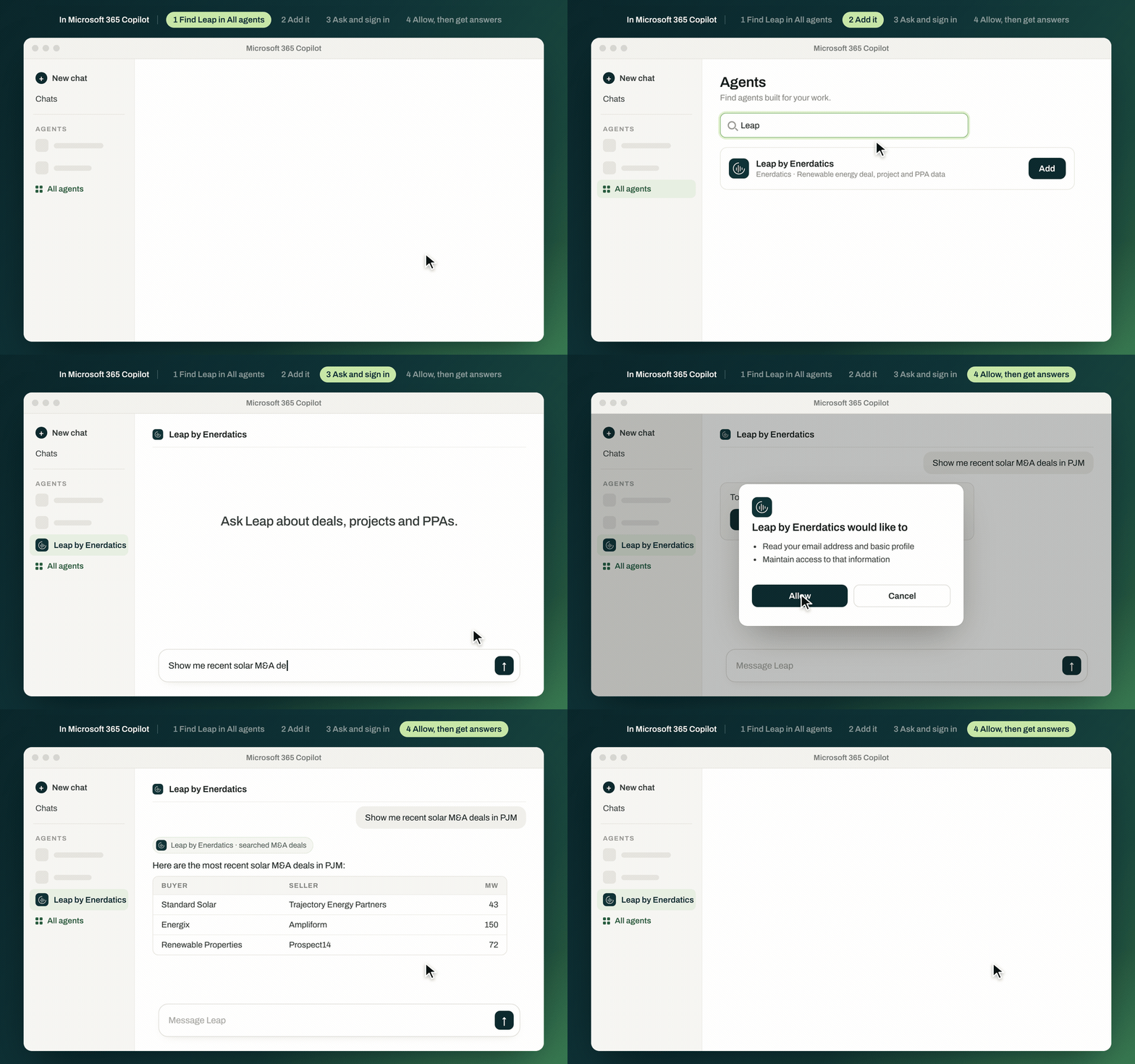
Leap appears in Copilot as an agent. You add it once, sign in and allow access.
- Go to m365.cloud.microsoft/chat and sign in with your work account.
- In the left panel under Agents, select Leap by Enerdatics. If it is not there, select All agents, search for Leap and select Add.
- Ask your first question. When Copilot asks, select Sign in. Signing in with your Microsoft work account is the quickest route.
- When Copilot asks for permission to use Leap, select Allow. You only sign in and allow access once.
For fuller answers, open Copilot's model selector and pick an advanced model such as Claude or GPT. Leap also works in Copilot Cowork for longer, multi-step tasks such as reports. Pin Leap in your Agents list so it is one click away. If you cannot find Leap at all, your IT team may need to enable it for your organisation.
What can you ask Leap once it is connected?
Ask the way you would ask an analyst. Leap answers from the Enerdatics database and links every record back to its source, so you can check a figure before you use it.
- “Who bought solar projects in PJM this year, and from whom?”
- “Which battery storage projects in Texas are under construction, and who owns them?”
- “Who were the most active buyers of battery storage assets in Europe this year?”
Enerdatics records 41 solar M&A deals in PJM announced in 2026 up to early November, 37 battery storage projects under construction in Texas, and 123 battery storage deals in Europe this year. Enlight Renewable Energy was the most active European buyer, with six deals.
What does Leap see when you sign in?
Only what it needs to confirm who you are. Leap reads your email address and basic profile and nothing else from your account. It cannot read your mail, files or calendar.
The “maintain access” permission covers those two items only. It keeps you signed in so you are not asked to log in each time. Leap's access to Enerdatics data is read-only, and you see only the data your subscription covers. Our privacy policy has the detail.
Who can use Leap?
Leap is available to Enerdatics subscribers with Leap access. Your organisation is recognised from your sign-in, so there are no API keys to share or manage.
Not a subscriber yet? Try three free questions in Enerdatics' own interface, with nothing to connect, or book a demo.
Frequently asked questions
Do I need a paid Claude plan to use Leap?Anthropic says connectors from its directory are available to all Claude users. On Team and Enterprise plans, an owner must add Leap for the organisation before members can connect. You also need an Enerdatics subscription with Leap access.
Why can't I find Leap in Microsoft 365 Copilot?Select All agents and search for Leap. If it still does not appear, your IT team may need to enable the agent for your organisation.
Do I have to sign in every time?No. You sign in and allow access once, and Leap keeps your session active in the background.
Can I connect Leap to ChatGPT or other AI tools?Yes. Any assistant that supports remote MCP connectors can use Leap's server URL, https://leap.enerdatics.ai/mcp. The Leap documentation has the steps for ChatGPT, Cursor, VS Code and Claude Code.
What data can I ask Leap about?Enerdatics M&A deals, financings, PPAs, utility-scale and distributed generation projects, data centres and research insights, with company profiles, valuation benchmarks, league tables and advisor lookups.
Already a subscriber? Connect Leap in Claude or Copilot and ask your first question today. New to Leap? Read how Leap works or try three free questions.